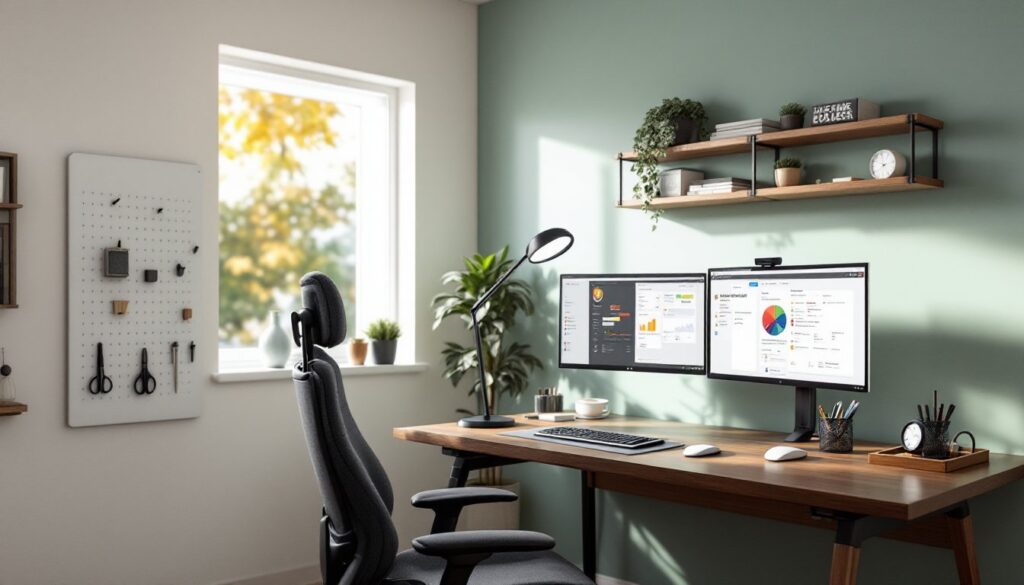
A poorly designed office doesn’t just look bad, it saps energy, kills focus, and turns an eight-hour workday into a slog. Whether you’re converting a spare bedroom into a home office or rethinking a dedicated workspace, intentional design choices directly impact how well you work. This isn’t about throw pillows and accent walls for Instagram. It’s about lighting that doesn’t give you headaches, a chair that supports your back through deadline sprints, and a layout that keeps distractions at bay. The good news? Most office design improvements are DIY-friendly, budget-conscious, and don’t require an architecture degree.
Table of Contents
ToggleKey Takeaways
- Effective interior design for offices directly impacts productivity and well-being by addressing lighting, furniture comfort, and organization to reduce eye strain, back pain, and cognitive distractions.
- Proper task lighting with layered artificial light (4000K-5000K color temperature) and ergonomic seating (adjustable lumbar support, 250-400 dollar range) are essential non-negotiable investments for any productive workspace.
- Color psychology plays a measurable role in office performance—blue promotes focus, green reduces eye strain, and warm neutrals offer versatility, while avoiding pure white which creates harsh reflections under artificial light.
- Strategic space planning that positions your desk to minimize distractions and keeps primary tools within arm’s reach improves workflow efficiency and mental focus throughout the workday.
- DIY office design projects like floating shelves, pegboard organizers, and acoustic panels add functionality and personalization without expensive renovations, making office interior design accessible to any budget.
Why Office Interior Design Matters for Productivity and Wellbeing
The link between workspace design and performance isn’t anecdotal, it’s measurable. Poor lighting causes eye strain and fatigue. Uncomfortable seating leads to chronic back pain. Visual clutter competes for cognitive bandwidth, making it harder to concentrate on complex tasks.
A well-designed office addresses these friction points systematically. Proper task lighting reduces glare on screens. Ergonomic furniture supports natural posture during long work sessions. Organized storage keeps essential tools within arm’s reach without creating visual chaos. Color choices influence mood and energy levels in ways backed by decades of psychological research.
Home offices face unique challenges. Unlike corporate spaces with dedicated IT closets and reception areas, home workspaces often share square footage with family life. Effective design creates clear boundaries, physical and psychological, that signal when you’re in work mode. This separation matters whether you’re on video calls or deep in focus work.
The return on investment is straightforward. An extra $200 spent on a quality desk lamp and a supportive chair pays dividends in reduced fatigue and fewer lost hours to distraction. For professionals working from home full-time, the workspace isn’t just a corner of the house, it’s infrastructure.
Essential Elements of Effective Office Interior Design
Every functional office design starts with three non-negotiable elements: lighting, furniture, and spatial organization. Get these right, and you’ve built a foundation that supports focus and comfort.
Lighting Solutions That Energize Your Workspace
Natural light is the gold standard. Position your desk perpendicular to windows when possible, facing a window creates glare on screens, while having your back to it casts shadows on your work surface. If you’re stuck with a north-facing room or basement office, don’t despair.
Layered artificial lighting makes up for what daylight can’t provide. Start with ambient overhead lighting, a flush-mount LED fixture with a color temperature between 4000K and 5000K mimics daylight without the harsh blue cast of cheap commercial LEDs. Add task lighting directly over your work surface: an adjustable desk lamp with a CRI (Color Rendering Index) above 90 shows colors accurately, crucial for design work or reading detailed documents.
Avoid relying on a single overhead can light. It creates harsh shadows and uneven illumination. If you’re installing new fixtures, consider dimmers on separate circuits for overhead and accent lights, this lets you adjust intensity based on time of day and task.
Safety note: When running new electrical circuits, work must comply with NEC (National Electrical Code) standards. Most jurisdictions require a permit and inspection for new wiring. If you’re not comfortable working with 120V circuits, hire a licensed electrician.
Furniture Selection for Comfort and Function
The desk and chair anchor everything else. A standard desk height is 29-30 inches, but that assumes average adult proportions. If you’re setting up a permanent workspace, measure seated elbow height and subtract 2 inches, that’s your ideal keyboard surface height.
Desk surface area matters more than aesthetics. A minimum of 48 inches wide by 24 inches deep accommodates a monitor, keyboard, and some paperwork. If you use dual monitors or need space for reference materials, bump that to 60 inches wide. Avoid glass-top desks, they look sleek but show every fingerprint and create glare.
For chairs, skip the $50 big-box specials. They’ll feel fine for a week, then start causing lower back pain. Look for adjustable lumbar support, seat depth adjustment, and armrests that move up, down, and laterally. You don’t need a $1,200 Herman Miller, but a $250-$400 mid-range ergonomic chair is a worthwhile investment. Many workspaces benefit from ideas seen in home office galleries that balance function with aesthetics.
Storage should be within reach but not cluttering your primary work surface. A lateral file cabinet or set of wall-mounted shelves keeps supplies accessible. If your office doubles as a guest room, consider a Murphy desk or wall-mounted fold-down surface to reclaim floor space when not working.
Color Psychology: Choosing the Right Palette for Your Office
Paint is the fastest, most cost-effective way to shift a room’s feel. But color choice isn’t purely aesthetic, it influences mood and energy in measurable ways.
Blue tones (think navy, slate, or steel blue) promote focus and calm. They’re a solid choice for analytical work, accounting, coding, writing. Avoid overly saturated blues, which can feel cold and institutional. Balance them with warm wood tones or brass accents.
Green hues reduce eye strain and create a sense of balance. Sage, moss, or muted olive work well in offices where you need sustained concentration without the sterile feel of pure white walls. Green also pairs well with natural materials and plants.
Warm neutrals, greige, taupe, warm gray, offer versatility. They don’t compete with artwork or accent pieces and work in both traditional and modern design schemes. A flat or eggshell finish hides wall imperfections better than satin or semi-gloss.
Avoid pure white in home offices. It creates harsh reflections under artificial light and can feel clinical. If you want a light, airy feel, go with an off-white with warm undertones, something with an LRV (Light Reflectance Value) around 85-90.
Accent walls can work, but use them strategically. A darker accent behind your desk creates depth without overwhelming the room. If you’re painting over dark or heavily saturated colors, expect to apply a stain-blocking primer and two coats of finish paint. One gallon of quality paint covers about 350-400 square feet per coat, calculate accordingly.
PPE reminder: Use a respirator rated for organic vapors when painting indoors, even with low-VOC paints. Open windows and run a fan for ventilation.
Space Planning and Layout Strategies for Home Offices
Layout determines workflow efficiency. A poorly planned office forces you to swivel, reach, and interrupt focus constantly. Good spatial planning keeps essential tools within arm’s reach and secondary items accessible but out of the primary workspace.
Start by identifying your primary work zone, the 24-inch radius around your seated position. This is where your keyboard, mouse, phone, and most-used supplies live. Everything else is secondary.
Position your desk to minimize distractions. If possible, face a wall or window rather than a door, this reduces visual interruptions from foot traffic. If your office is in a high-traffic area, consider a partial wall or bookshelf as a visual barrier. This approach mirrors strategies used in small-space design, where every square foot must pull double duty.
Electrical planning often gets overlooked until you’re tripping over extension cords. Count your devices, computer, monitors, printer, desk lamp, phone charger, speakers. Most home offices need at least four to six outlets in the primary work zone. A surface-mounted power strip with surge protection is fine for temporary setups, but if you’re renovating, add dedicated 20-amp circuits for equipment.
If the office shares space with another function (guest room, craft area, storage), use visual dividers. A bookshelf, folding screen, or even a change in wall color creates psychological separation without requiring construction. Platforms like Dwell showcase how modern homes integrate multipurpose spaces.
Cable management isn’t optional. Loose cables collect dust, create tripping hazards, and look sloppy on video calls. Use adhesive cable clips along the desk edge or back, and bundle runs with Velcro straps (not zip ties, you’ll need to adjust them). For a cleaner look, drill a 2-inch grommet hole in the desk surface and route cables through it to a power strip mounted underneath.
DIY Office Design Projects to Personalize Your Space
Once the functional elements are in place, personalization makes the space yours. These DIY projects add character without requiring advanced skills or tools.
Floating Shelves
Wall-mounted shelving adds storage and display space without eating up floor area. Use 1×10 or 1×12 pine boards (actual dimensions: 3/4″ x 9.25″ or 11.25″) cut to length. Mount them on heavy-duty brackets rated for at least 50 pounds per pair. Locate studs with a stud finder, drywall anchors alone won’t support books or equipment.
For a cleaner look, use blind shelf supports (metal rods that insert into holes drilled in the shelf end). This requires precise measurement and a 3/4-inch spade bit, but the floating effect is worth it. Finish with satin polyurethane or a colored stain.
Custom Pegboard Organizer
Pegboard turns vertical space into functional storage. Buy 1/4-inch tempered hardboard pegboard and cut it to size with a circular saw. Mount it 1 inch off the wall using spacer blocks (this allows hooks to insert fully). Paint it to match your office palette, primer plus two coats of semi-gloss for easy cleaning.
Use metal S-hooks, basket holders, and tool clips to organize supplies. Unlike commercial desk organizers, pegboard adapts as your needs change. This flexibility is valued in adaptable workspace designs that evolve over time.
Acoustic Panels
Hard surfaces create echo, making video calls sound hollow and distracting. DIY acoustic panels improve sound quality without professional installation. Cut 2-inch thick Roxul Safe’n’Sound insulation to fit inside 1×4 pine frames (build simple rectangles with butt joints and wood glue). Wrap the frame and insulation in acoustically transparent fabric (burlap, linen, or speaker cloth) and staple it tight on the back.
Mount panels on walls opposite hard surfaces, behind your desk, on the wall facing your desk, or on the ceiling. Two to four panels in a 10×10 room make a noticeable difference. Resources like Homedit often feature creative approaches to sound management in home offices.
Desktop Organizer Tray
A custom desktop organizer keeps small items corralled. Cut compartments from 1/2-inch plywood using a miter saw or table saw. Glue sections together with wood glue and reinforce joints with 1-inch brad nails. Sand smooth (120-grit, then 220-grit) and finish with Danish oil or paint.
Size the compartments to fit your actual supplies, pens, sticky notes, charging cables. This beats generic store-bought trays that waste space on features you don’t use.
Safety notes: Always wear safety glasses when cutting wood. Use a dust mask or respirator when sanding, fine wood dust is a respiratory irritant. If using power tools (miter saw, table saw, router), keep hands clear of the blade path and use push sticks for narrow cuts.
These projects require basic carpentry skills and common tools: a drill/driver, circular or miter saw, level, tape measure, and clamps. If you don’t own a miter saw, a circular saw with a speed square works, cuts won’t be as clean, but paint or stain hides minor imperfections. Techniques from budget-friendly commercial design can inspire creative material choices.
A well-designed office isn’t a luxury, it’s a productivity tool. The upfront effort pays off in daily comfort and efficiency, whether you’re working from home full-time or need a dedicated space for side projects.